March 26, 2026
FLUX VS GEMINI FLASH: I TESTED BOTH SO YOU DON'T HAVE TO
Last Tuesday I deleted 23 gigabytes off my laptop and got better images for it.
I'd downloaded FLUX.1-schnell from Black Forest Labs. 12 billion parameters. Open source, fully local. Then I ran it head-to-head against Google's Gemini 2.5 Flash, Google's image generation API ($0.039/image).
Same prompts. Scored blind. Three of the hardest things you can ask an image generator to do.
~23GB on disk. 45 minutes of setup. Here's what happened.
THE SETUP: FLUX.1-SCHNELL VS GEMINI 2.5 FLASH
Hardware: MacBook Pro, M4 Max, 64GB unified memory
Local model: FLUX.1-schnell — 12B params, 4-step inference, ~23GB on disk
Cloud model: Gemini 2.5 Flash image generation — $0.039/image via Google API
Test: 3 identical prompts, blind scoring, head-to-head
Getting FLUX running took 45 minutes. Missing config files. I had to reconstruct the pipeline manifest, create a scheduler config, install PyTorch and the diffusers library, work around SSL issues, and point the loader at the right snapshot path inside HuggingFace's cache.
Gemini took three lines of code and a POST request.
One thing to note: I tested schnell, the speed-optimized variant. It runs in 4 inference steps. FLUX-dev uses 50 steps and produces noticeably better results. So this isn't a test of FLUX at its best — it's a test of FLUX at its fastest. More on that later.
HEAD-TO-HEAD: 3 IMAGE GENERATION TESTS
Test 1: AI Portrait Photography
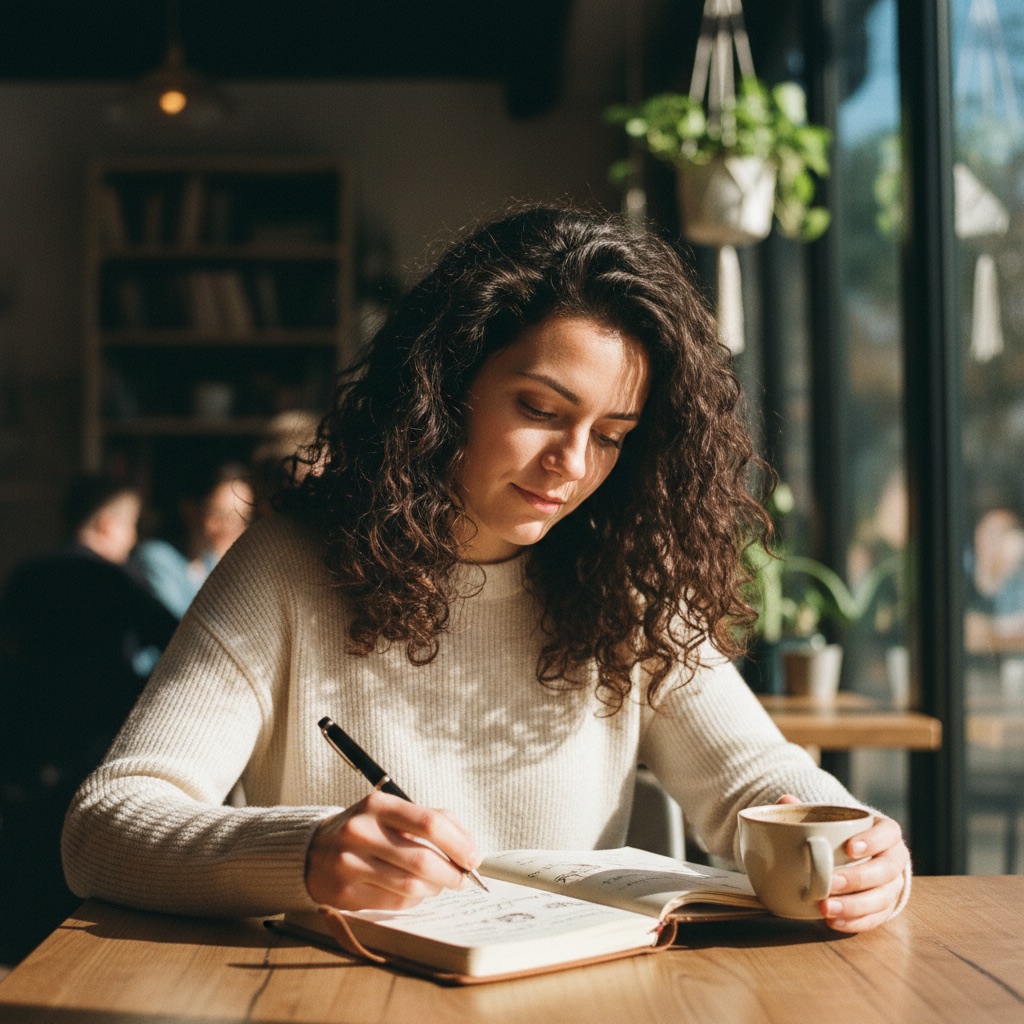

FLUX gave me a pleasant but obviously fake image. Too-smooth skin, waxy fingers, vacant expression. I asked for her writing in a journal. She's reading a book. It feels posed.
Gemini's version looks like someone actually took this photo. Natural skin, correct hands holding a pen, an absorbed expression. This could run in a magazine before anyone questions it.
Winner: Gemini. Better face, better hands, better emotional quality.
Test 2: AI Text Rendering on a Concert Poster


This is where FLUX fell apart. The top reads "JAZZ" but drops "NIGHT." The bottom, which should say "FRIDAY DEC 5 · DOORS 8PM," came out as FRIEALY US — DOOR 8PM. It rendered a saxophone. Not a player. Just the instrument.
Gemini nailed every word. Clean typography, proper hierarchy, full saxophone player in art deco style. Looks like it came from a print shop.
Winner: Gemini, decisively. A poster with unreadable text is a failed poster.
Test 3: AI Text in a Movie Poster
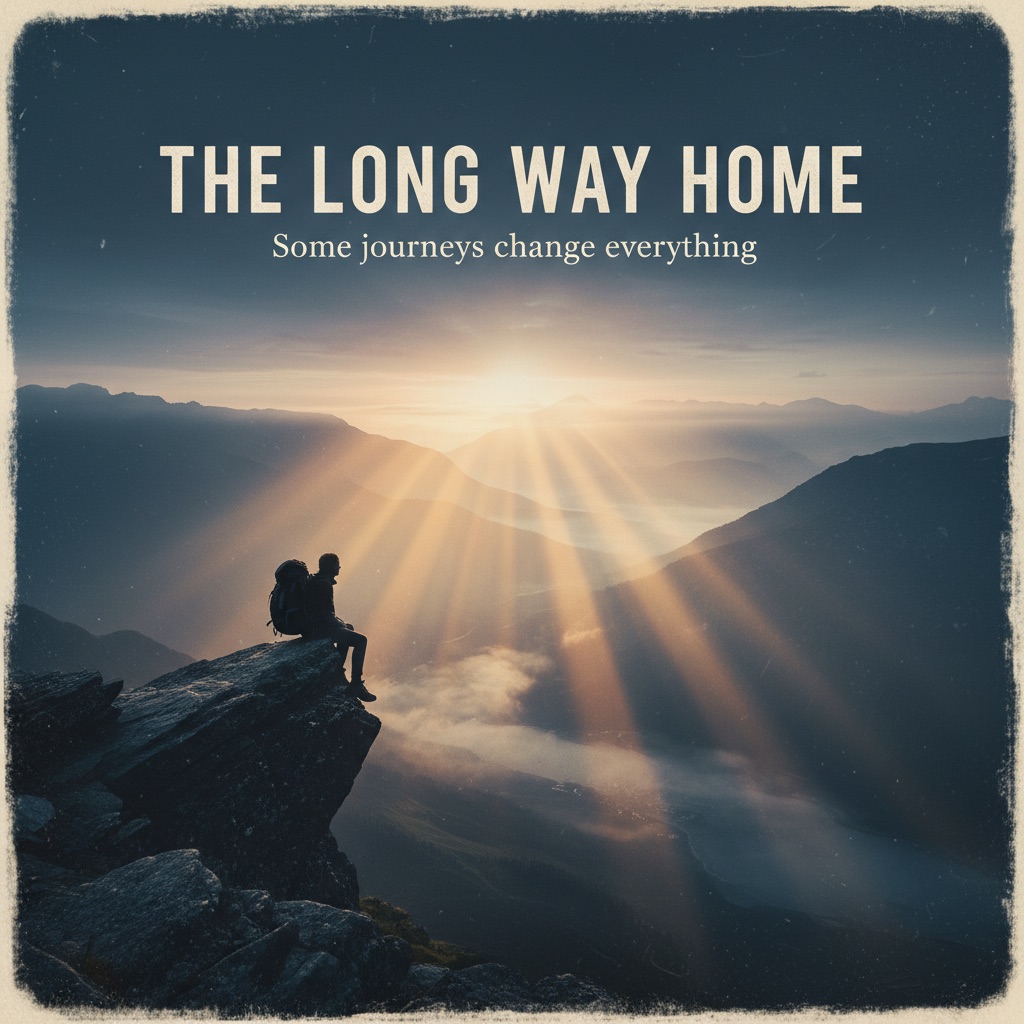

FLUX got the title right. "THE LONG WAY HOME" is legible. But the tagline became Some joi creange everything. It also hallucinated a Disney logo.
The color grading was beautiful, though. That's the frustrating part.
Gemini rendered both title and tagline letter-perfect. Proper sizing, no hallucinated logos. Comparable atmosphere, better composition.
Winner: Gemini. Perfect text, no hallucinations.
FULL RESULTS: FLUX VS GEMINI FLASH SCORES
| Test | FLUX (Local) | Gemini Flash | Winner |
|---|---|---|---|
| Human Portrait | 6.4 / 10 | 8.2 / 10 | Gemini |
| Concert Poster | 5.0 / 10 | 8.0 / 10 | Gemini |
| Movie Poster | 6.0 / 10 | 9.0 / 10 | Gemini |
| Speed | ~40s / image | ~8s / image | Gemini (5x faster) |
| Setup Time | ~45 minutes | 3 lines of code | Gemini |
| Cost | $0 + fan noise | $0.039 / image | FLUX (free after download) |
| Disk Space | ~23 GB | 0 GB | Gemini |
WHERE FLUX.1-SCHNELL FALLS SHORT
AI text rendering: FLUX can't do it
Any words in the image, any use case at all, and FLUX is out. "FRIEALY US" and "joi creange" aren't edge cases. That's the norm for diffusion models without dedicated text training. Gemini handles it natively.
People look synthetic
The portrait had the telltale AI look. Skin too smooth, expression too neutral, fingers fused. Gemini produced someone who felt present.
It doesn't follow the prompt
FLUX swapped "writing in a journal" for "reading a book." Rendered a saxophone instead of a saxophone player. Hallucinated a Disney logo. Gemini followed the prompt precisely.
WHAT FLUX.1-SCHNELL DOES WELL
Lighting and atmosphere. FLUX has a specific filmic quality that's genuinely appealing. The movie poster's color grading was beautiful even with garbled text. In a preliminary round, a cafe scene with morning light scored 9/10 for lighting alone.
If you strip out text and don't need prompt adherence, FLUX produces moody, atmospheric images. But that's a narrow use case.
WAIT — COULD BETTER PROMPTING CLOSE THE GAP?
After running these tests, I had to ask the obvious question: did FLUX lose because it's worse, or because I didn't try hard enough?
For images without text — probably yes, better prompting would close the gap. I tested schnell with 4 inference steps and basic prompts. FLUX-dev uses 50 steps and produces significantly better results. If I built a proper pipeline around it — multi-candidate generation, automated scoring, prompt refinement loops — the image quality would improve substantially. I already run this kind of pipeline with Gemini for other projects. Same approach would help here.
For text in images — no. No amount of prompting fixes FRIEALY US. That's not a prompt problem. It's architectural. Diffusion models generate pixels by denoising random noise. They don't understand letterforms. Gemini's architecture handles text natively. No iteration pipeline changes that.
If your images need words, FLUX is out. If they don't, the quality gap is smaller than my test suggests.
THE VERDICT ON GENERATION
For generating images from scratch, a cloud API beat a ~23GB local model on every metric I tested. Speed, quality, text accuracy, prompt adherence, setup time, disk space.
I deleted the model. Reclaimed 23 gigs. Kept using Gemini Flash.
THE PART I DIDN'T EXPECT
After deleting those 23 gigabytes, I regenerated every single FLUX test image through a free cloud API. Same model. Same quality. Took seconds.
The 45-minute setup, the config files, the PyTorch install, the SSL workarounds. None of it was necessary. I could have hit an endpoint the whole time.
Twenty-three gigabytes of hard drive space, for nothing.
BUT I WAS ASKING THE WRONG QUESTION
Here's what I realized after all of this: I was testing local AI at the thing cloud does best. That's like benchmarking your home kitchen against a restaurant by ordering the same dish. Of course the restaurant wins. That's what restaurants do.
The question isn't "can local AI generate better images than a cloud API?" It's "what can local AI do that cloud can't?"
And the answer turns out to be: editing real photos.
Outpainting: extend any photo to any aspect ratio
Take a real photo shot at 4:3. Need it at 9:16 for an Instagram story. Instead of cropping and losing content, a local inpainting model extends the image — generating the missing edges while keeping the original intact. Your real photo stays real in the center. The AI fills in what should be there around it.
Object removal
Someone's elbow in your cafe shot. A power outlet behind a product display. A car in the background of a lakeside photo. Local models remove it and fill in what should be behind it. No Photoshop subscription. No uploading your photos to a server.
Background replacement
A product photo on your kitchen counter becomes a product photo on dark slate, on a rustic table, in a styled environment. The product stays real. Only the background is generated. Locally, privately, at any volume.
AI upscaling
Real-ESRGAN takes a low-res image and upscales it 4x with AI enhancement. This one is genuinely best-in-class — it matches or beats cloud upscaling services. It's a 60MB download. Runs in seconds on Apple Silicon. If you have old photos, small screenshots, or images that need to be print-ready, this is the tool.
Fine-tuning on your brand
This is the real power move. Train a lightweight adapter (called a LoRA) on 20-30 images that match your visual style. Every image the model generates after that carries your aesthetic. Cloud APIs can't do this. It's the difference between a restaurant's menu and your own recipe book.
WHEN LOCAL AI IMAGE GENERATION IS WORTH IT
The sweet spot for local AI isn't "better than cloud." Think of it like cooking vs restaurants.
A great restaurant gives you a better meal, faster, with zero cleanup. If you just want to eat well, go to the restaurant.
But a restaurant can't make your grandmother's exact recipe. Can't cook at 3am when everything's closed. Can't feed 200 people for the cost of groceries. Can't keep your secret recipe private.
That's what local AI is for:
- Editing real photos — outpainting, object removal, background replacement. Your images never leave your machine.
- Fine-tuning — training on your brand's visual style. Cloud can't do this.
- Offline — no internet, still works.
- Scale — tens of thousands of images a day at zero marginal cost.
- Upscaling — Real-ESRGAN is best-in-class and runs locally in seconds.
For generating images from scratch, cloud wins. For editing and enhancing the photos you already have, local has a real edge.
The best tool isn't the most impressive one. It's the one that gets out of your way.
I deleted the ~23GB generation model. But I'm setting up a local editing pipeline — outpainting, object removal, upscaling — for working with real photos across my projects. About 10GB of models. No subscription. No uploads. No per-image cost.
Generation goes to the cloud. Editing stays on the laptop. Each tool doing what it's actually best at.