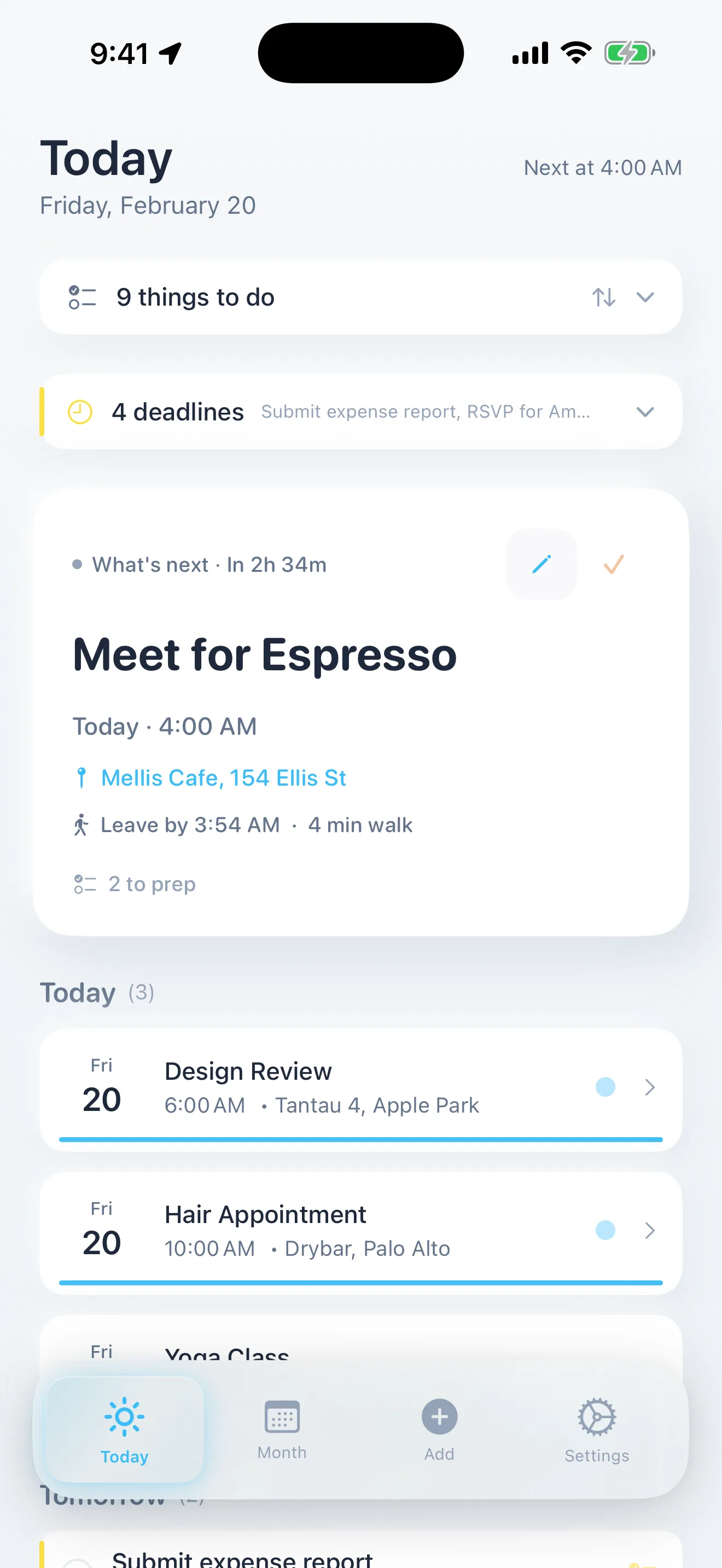
Composed 1.7.3 is the calm, voice-first iPhone planner that just shipped to the App Store on May 15, 2026. You say a plan out loud — "Dentist Thursday at 2pm on Main Street" — and Composed schedules it, generates a prep checklist, and sends a "time to leave" nudge factoring in real-time traffic. You snap a hotel confirmation or a flight email and Composed reads it, builds the trip, and reminds you about check-in and boarding. Version 1.7.3's marquee change is a calm Occasions card for birthdays and anniversaries — they now sit in their own gentle row on the Today view instead of crowding the things you actually have to do. Plus a full accessibility pass: Reduce Motion respect, VoiceOver labels on every custom control, and clean Dynamic Type behavior. The free tier includes 5 active events with every feature working; calendar-imported events don't count. Get Composed on the iPhone App Store →
Composed — on the iPhone App Store
Voice-first AI planner. Events, tasks, and notes in one calm timeline. Free tier with 5 active events; calendar imports don't count. Composed Pro starts at $7.99/week, $29.99/year (with a 7-day free trial), or $79.99 lifetime — handled by Apple.
Get Composed on the App StoreWhy I built a planner that refuses to yell at you
I run a cafe called Cafe Meria, and I run a few software projects from a desk in the same building. On a normal Wednesday I'm juggling three espresso shots, two Zoom calls, a delivery driver who didn't text, my son's school pickup, a feature ship I promised someone in another time zone, and a hotel checkout I haven't packed for. Standard chaos.
For years, every "productivity" app I tried made the chaos worse. They wanted to put a red badge on a task I hadn't done yet. They wanted to label things Overdue. They wanted to send me a notification at 11pm that said "Don't forget!" about something I genuinely could not forget — it was the loud thing crowding everything else. They were designed by people whose stress is solved by louder reminders. Mine is made worse by them.
I have an attentional brain. I know this because I've lived in it for forty years. I do not need an exclamation point. I need a quiet system that tells me what's next, helps me get ready, gives me a calm "time to leave" tap on the shoulder, and otherwise stays out of the way. I needed a calm planner. I couldn't find one. So I built one.
Composed is what I built. It's an iPhone app — currently on the App Store at apps.apple.com/us/app/composed/id6758595168 — and it just shipped its sixth feature release of 2026. Version 1.7.3 went live on the App Store on May 15. The marquee change in 1.7.3 is small but emblematic of the whole project's philosophy: birthdays and anniversaries no longer crowd your day like to-dos. They live in their own calm Occasions card. The people you care about stay right there, gentle and present, instead of demanding attention next to your dentist appointment.
I do not need an exclamation point. I need a system that tells me what's next and otherwise stays out of the way.
What Composed actually does
The headline answer: Composed brings events, tasks, and notes into one timeline, and you put things into it by speaking, by snapping a photo, or by typing. Everything else flows from those three input modes.
Say it
You tap the microphone and just talk. "Dentist Thursday at 2pm on Main Street." "Flight to Denver next Friday morning." "Sarah's birthday next month." "Coffee with Marcus Saturday at 7." Composed runs hybrid transcription — Apple's on-device Speech framework first for instant on-screen feedback, with an optional refinement pass through OpenAI Whisper when Apple's confidence drops below a calibrated threshold (a smart cost-cutting move: most utterances stay on-device; only the ambiguous ones cost a fraction of a cent). The transcript then goes through an AI parsing pipeline that understands events versus tasks versus notes, resolves the time, resolves the location ("Main Street" gets matched to your Main Street, not a Main Street four states away), and assembles a structured event object you confirm before saving.
It feels closer to talking to a person than typing into a form. That's the point. The cognitive cost of opening a date picker, choosing a duration, finding a venue, and adding a reminder is exactly the cost that kept me from using calendar apps for years.

Snap it
You're in your email looking at a Marriott confirmation, or a Delta itinerary, or an Airbnb receipt. You screenshot it. You hand the screenshot to Composed. Composed's parser extracts every relevant field — hotel name, check-in date, checkout date, address, confirmation code, lockbox code if present, flight number, departure and arrival airports with correct timezones, terminal and gate if shown, layover detail — and builds the event. For flights specifically, Composed maintains an internal IATA airport dictionary that resolves timezones from airport code, not device timezone, which sounds boring until you realize most other apps will show a New York-departing-9pm-arriving-Los-Angeles-midnight flight in the user's home timezone and quietly lie about everything: arrival time, "time to leave" buffer, the works. Composed gets this right. There is a whole subsystem in the app — built up across nineteen production releases — for getting flight time math right, because everyone gets it wrong.

Type it
Or just type. If your hands are full of dishes or you're in a quiet office, type "School pickup Friday 3pm" and it parses the same way. Type "Pick up dry cleaning tomorrow" and it lands as a task. Type "Idea for the menu — espresso tonic with grapefruit zest" and it lands as a note. The same AI pipeline; different inputs; one calm interface.
Then Composed gets you ready
The thing that makes Composed feel different from "a calendar app" is what happens after you add something. For each new event, Composed generates an AI prep checklist tailored to the event type. A dentist appointment gets Bring insurance card and Arrive 15 minutes early. A job interview gets Print resume, charge headphones, scout parking. A first date gets, well, fewer things, more calmly. A camping trip gets a real packing list. Each checklist item has a deadline so nothing slips, and the app computes a "readiness score" that you can watch climb to 100% as you tick things off. When you hit 100%, the app surface goes quiet and shows the word Composed. That's your signal. You're ready. Just go.
Then, on the morning of the event, Composed calculates real-time travel time from where you actually are to where the event is and sends a single calm push: "Leave by 1:24 to make your 2pm — moderate traffic on Main." For flights it factors in a 120-minute domestic or 180-minute international airport buffer plus security plus check-in. For local events it factors in the day's actual traffic via Apple Maps. No "URGENT — Leave NOW" — just one specific minute, picked correctly.
What's new in Composed 1.7.3
Version 1.7.3 is small but emotionally significant. It's the version where birthdays and anniversaries finally got the treatment they deserved.
The calm Occasions card
For most of Composed's history, recurring annual events like birthdays and anniversaries went into the same timeline as your obligations. Which meant they showed up on your Today view as items competing for your attention — "Bea turns 8 today" sitting one row up from "leave for dentist." A real moment of joy reduced to a calendar row. Worse, they accumulated. If you had thirty friends with birthdays this month, your Today view started to feel like a stressful list.
In 1.7.3 they live in their own card. Names, ages, how soon. "Bea turns 8 today." "Marcus turns 41 in 3 days." "Anniversary in 2 weeks — 12 years." The card stays gentle. It doesn't push notifications unless you ask it to. It doesn't compete with the things you have to do. The people you care about stay right there, present and warm, while your obligation timeline shows only what actually requires action.
It's a small change. It took weeks of design iteration. And it solves something that no other planner app I know of has solved: the right way to surface the emotional layer of a calendar without flattening it into another row of tasks.

A real accessibility pass
The other big change in 1.7.3 is invisible to most users and load-bearing for some: Composed now respects Reduce Motion across every single animation in the app, has VoiceOver labels on every custom control (the bullet-point picker in the notes editor, the readiness ring, the day-cell combined-result labels in the Month view, the empty-state composites), and reads cleanly with Dynamic Type at its full range. If you use macOS or iOS with VoiceOver, or you've ever had to dial back animations because they trigger motion sickness, or you live at AccessibilityXXXLarge — Composed now meets you where you are.
That work is unglamorous. Almost nobody will ever post about it on X. But if I want this app to set the standard for indie iPhone planners, the standard has to be: everyone gets in.
Why the calm design rules matter (and why they are rules)
Composed has a written design rulebook. The first page of it lists things the app will never do.
It will never use the words Overdue, Late, Behind, Urgent, Warning, Alert, Deadline missed, or Don't forget. It will never use the colors green, pink, magenta, red, or orange — those colors carry pressure semantics in nearly every other app, and once you're sensitized to them they become exhausting. It will never use exclamation points. If a deadline has passed, the visual treatment is a calm yellow — not a red error — and the language is "Added 3 days ago" rather than "Overdue."
These rules exist because the moment you let one of them in, the whole emotional posture of the app collapses. A single red badge in a calm interface is more aggressive than ten red badges in a normally aggressive interface, because the contrast does the shouting. So we hold the line. Sky blue (#38BDF8) for progress and environment. Warm sand (#F2C4A0) for completion. Yellow (#FDE047) for selections and any timing signal. Past-due things use a deeper sunny gold (#FACC15), never error red.
The result is an app that has the strange property of making people relax when they open it. Several early users have told me, unprompted, that Composed is the first planner they've ever installed where opening the home screen doesn't immediately tighten their chest. That sentence — every time I get it — is worth more than any feature roadmap.

Real users, real energy — Composed is growing
Composed has been on the App Store since February 23, 2026 — about thirteen weeks at the time of this post. We've shipped seven major version releases in that window (1.1, 1.2, 1.3, 1.4, 1.5, 1.6, 1.7, plus 1.7.1, 1.7.2, and now 1.7.3 patches), which works out to a release roughly every nine days. Each one was approved by Apple App Review, often within twenty-four hours of submission. That is a rare and good thing for a calm-design app to do.
More importantly, real people are paying for it.
I have always been allergic to apps that brag about user counts before they have user counts worth bragging about. So I'll be honest about scale: Composed is still small. It's not on the front page of the App Store. It's not in The Verge. It's a quietly growing list of people who found it, tried the free tier, and decided to pay for unlimited events because the app gave them something every other planner had failed to give them. Some of them subscribed weekly to see if the magic held. Some of them paid for a year. A few of them paid for lifetime.
The energy is real. The growth is real. The path is the calm one — no growth hacks, no fake testimonials, no dark-pattern paywalls. People find Composed because somebody who already loves it told them about it. That's how indie software is supposed to work, and it's the only kind of growth that compounds.
If you've read this far and the calm-planner framing rings true for you — install it, try the free tier, see how it feels in your life for a week. That is the entire ask.
Try the free tier — 5 events, every feature
Apple Calendar and Google Calendar imports don't count against the limit. Voice input, AI prep checklists, smart departure alerts, flight intelligence, hotel timeline, Composed Notes — all work on the first five events you create. If Composed earns a spot in your routine, Pro unlocks unlimited events.
Download Composed for iPhoneWho Composed is for
Composed is for you if any of these read like a description of your life.
- You have an ADHD brain. Standard planners feel like task generators that yell. You need a calm capture surface that handles the planning math so your attention can go to the actual thing.
- You have an anxiety brain. Red badges and "OVERDUE" labels actively make your morning worse. You need an app whose emotional posture is: "you've got time, here's the next step."
- You're a parent juggling school events, doctor visits, kids' activities, partner schedules, and the entire household coordination problem. You need somewhere to put it all that doesn't punish you when one thing slips.
- You're a busy professional. Meetings, travel, prep, follow-ups — and you've outgrown both "I'll just remember" and "I have seventeen apps for this."
- You travel a lot. Hotels, flights, layovers, timezone changes. Composed's screenshot parser and flight intelligence subsystem are unusually good at this.
- You're an indie maker, a freelancer, a creator, a person whose work is also their identity, and your "calendar" is currently a notebook, Notes.app, and a Stripe dashboard. Composed brings the human side of your day into one place without pretending to be a project management tool.
- You just want a good iPhone app. Composed is built like a 1990s Mac utility — small, careful, fast, calm, and finished. It's the kind of app that earns a permanent spot in your dock and stays there.
How Composed compares to Fantastical, Things, TickTick, Motion, and Sunsama
People search for Composed by searching for what they're already using and hoping for something better. So briefly, honestly, on the comparison.
Fantastical is the calendar app with the best natural-language input on iOS. It's beautiful, mature, and expensive — a $4.99/month subscription. It does not generate prep checklists. It does not have a calm-design philosophy. It is, fundamentally, a calendar.
Things 3 is the most beautiful task manager ever made. I love it. It does not handle events, voice scheduling, screenshot parsing, or travel intelligence. It costs $9.99 once, which is a steal. If your needs end at tasks, use Things. Composed is for the people whose calendar and to-do list are the same problem.
TickTick is a feature-rich productivity Swiss army knife. It can do a lot. It is also visually loud — red badges, urgency framing, the works. If TickTick's posture works for you, you do not need Composed.
Motion is an AI scheduling assistant aimed at workflow automation for knowledge workers. It auto-schedules your tasks into time blocks. It costs $34/month. It's a different category of tool than Composed; Motion wants to be your manager. Composed wants to be a calm room.
Sunsama is a wonderful daily-planning ritual app aimed at deep workers. Web-first, $20/month-ish. It doesn't have voice input, doesn't handle screenshot parsing, and is structured around a knowledge-worker daily ritual rather than the messy reality of mixed personal-and-professional life. If Sunsama works for you, keep using it. They make a great product.
Composed sits in a different lane. Voice-first. AI-prepared. Calm-by-design. Events, tasks, and notes unified. A real free tier where everything works. Built for messy, mixed-life days — not knowledge-worker time-blocking. We are deliberately not trying to be the other apps. We're trying to be what nobody else is building.
What Composed costs
Composed has a real free tier. You get five active events with every feature working — voice input, AI prep checklists, smart reminders, screenshot parsing, flight intelligence, hotel timeline, Composed Notes, calendar sync. Events imported from Apple Calendar or Google Calendar don't count against the five. You can use Composed indefinitely on the free tier if five events is enough for your life.
Composed Pro unlocks unlimited events. There are three Pro tiers:
- Weekly — $7.99/week. The "try it for a week or two" tier. People use this to see if the magic holds across a varied week before committing.
- Annual — $29.99/year. The headline tier. Includes a 7-day free trial so you can experience unlimited events before you pay anything. This is what most people pick.
- Lifetime — $79.99 one-time. For the "I don't want to think about this subscription ever again" buyer. You pay once. You own the unlimited tier forever.
All billing is handled by Apple through the App Store. No separate account creation, no third-party payment, no credit card collection by Composed. If you have an existing Apple ID, you have an existing way to subscribe.
Where to download Composed
Composed lives on the iPhone App Store at apps.apple.com/us/app/composed/id6758595168. Open the App Store on any iPhone running iOS 17 or later, search "Composed" (the icon is a warm-sand background with a calm sky-blue gradient — Apple's category for it is Productivity), tap Get, sign in with your Apple ID, and it installs. No setup wizard. No account to create. The first thing it asks is whether you'd like to import from Apple Calendar or Google Calendar (you can skip and add later). Then you're in.
The product website is staycomposed.app — also reachable at composed.app — with the full feature tour, the calm-planning philosophy, the FAQ, pricing, and the newsletter (more on that below).

Frequently asked questions
What is Composed?
Composed is a calm, voice-first iPhone planner that brings events, tasks, and notes into one place. You say a plan out loud, snap a confirmation screenshot, or type it — Composed parses it with AI, generates a tailored prep checklist, and sends a "time to leave" nudge factoring in real-time traffic. There are no overdue labels, no red warnings, and no urgency framing. The free tier includes 5 active events with every feature; calendar imports don't count against the limit. Available on the iPhone App Store at apps.apple.com/us/app/composed/id6758595168.
What's new in Composed 1.7.3?
Composed 1.7.3, released on May 15, 2026, ships a calm Occasions card for birthdays and anniversaries. They no longer crowd your day like to-dos — they live in their own gentle card on the Today view with names, ages, and how soon, so your obligation timeline shows what you actually need to do while the people you care about stay right there. Version 1.7.3 also adds full Reduce Motion respect across every animation in the app, VoiceOver labels on every custom control, and clean Dynamic Type behavior for users on larger text sizes.
Is Composed really free?
Yes. The free tier includes 5 active events with every feature working — voice input, AI prep checklists, smart reminders, screenshot parsing, flight intelligence, hotel timeline, Apple Calendar and Google Calendar import. Events you import from Apple or Google Calendar don't count toward the 5. No credit card required. Composed Pro unlocks unlimited events starting at $7.99/week, $29.99/year (with a 7-day free trial), or $79.99 lifetime — all handled by Apple.
Who is Composed designed for?
Composed was designed for people who have enough going on already — ADHD brains and anxiety brains where standard planner apps make things worse with their red labels and pressure framing; parents juggling school events, doctor visits, and activities; busy professionals managing meetings, travel, and life; frequent travelers who don't want to think about check-in buffers; and anyone who has shown up unprepared and wished they hadn't. The brand voice is calm and intentional throughout — no exclamation points, no shame, no urgency theater.
How does Composed's voice input work?
You tap the microphone and just speak naturally — "Dentist Thursday at 2pm on Main Street" or "Flight to Denver next Friday" or "Sarah's birthday next month." Composed runs hybrid transcription (Apple's on-device Speech framework first, with OpenAI Whisper as an optional refinement when confidence is low) and then sends the text through an AI parsing pipeline that understands events, tasks, times, durations, locations, and travel intent from conversational language. You confirm the parsed event in a "Got it. Sound right?" sheet before it's saved.
How does Composed handle birthdays and anniversaries?
Starting with version 1.7.3, birthdays and anniversaries live in their own calm Occasions card on the Today view — separate from your obligation timeline. The card shows names, ages, and how soon. Composed reminds you in advance and tells you exactly how old someone is turning. You don't have to remember; Composed does, without making the rest of your day feel busier.
How does Composed compare to apps like Fantastical, Things, TickTick, Sunsama, or Motion?
Fantastical is a calendar with elegant natural-language input but no prep checklist or guilt-free design philosophy. Things 3 is a beautiful task manager but doesn't handle events, voice scheduling, or travel intelligence. TickTick is feature-rich but visually loud with red overdue labels and pressure framing. Sunsama is a great daily-planning ritual app aimed at knowledge workers but requires a subscription floor and no voice-first input. Motion is an AI scheduling assistant aimed at workflow automation, not calm personal life. Composed sits in a different lane: voice-first, AI-prepared, calm-by-design, with events, tasks, and notes unified in one timeline — and a free tier where everything actually works on the 5 events you have.
How does Composed handle flights and travel?
Snap a screenshot of your flight confirmation — boarding pass, airline email, ticket image — and Composed parses departure airport, arrival airport, flight number, times, and confirmation code. It uses an internal IATA airport dictionary to resolve timezone correctly (so a JFK 9pm to SFO arrival actually shows the right local time), schedules a five-alert cascade (check-in, summary, boarding, gate close, layover), and calculates your "leave for the airport" time factoring in a 120-minute domestic or 180-minute international buffer plus current traffic. The same screenshot pipeline works for hotel and Airbnb confirmations — Composed builds the timeline with check-in date, checkout date, address, and lockbox code if it's in the screenshot.
Is Composed available on Android?
Not yet. Composed is currently iPhone-only. An Android port was prototyped in early 2026 and shelved so iOS could ship to a higher standard. iPad is supported through the universal iPhone app, with iPad-specific layout. macOS is in the codebase but not shipping.
Is Composed's voice and screenshot data private?
Yes. Composed does not sell data, use advertising trackers, or retain audio recordings — Whisper transcription runs ephemeral, voice files are not stored. Your events live in your row-level-secured Supabase database accessible only to your signed-in account. You can delete your account and all data instantly from Settings. Composed uses Sign in with Apple and supports Apple's Hide My Email so we never see a real email address unless you choose to share one.
Where do I download Composed?
Composed is on the iPhone App Store at apps.apple.com/us/app/composed/id6758595168. Open the App Store on any iPhone running iOS 17 or later, search "Composed", and tap Get. The website is at staycomposed.app (also reachable as composed.app).